Serverless Resume Website on AWS
The Problem
I wanted to prove I could build and operate real cloud infrastructure end to end — not just write code, but host it securely, serve it over HTTPS on a custom domain, and automate every deployment. The goal was a live, production-grade site that doubles as evidence of hands-on AWS skills.
The Architecture
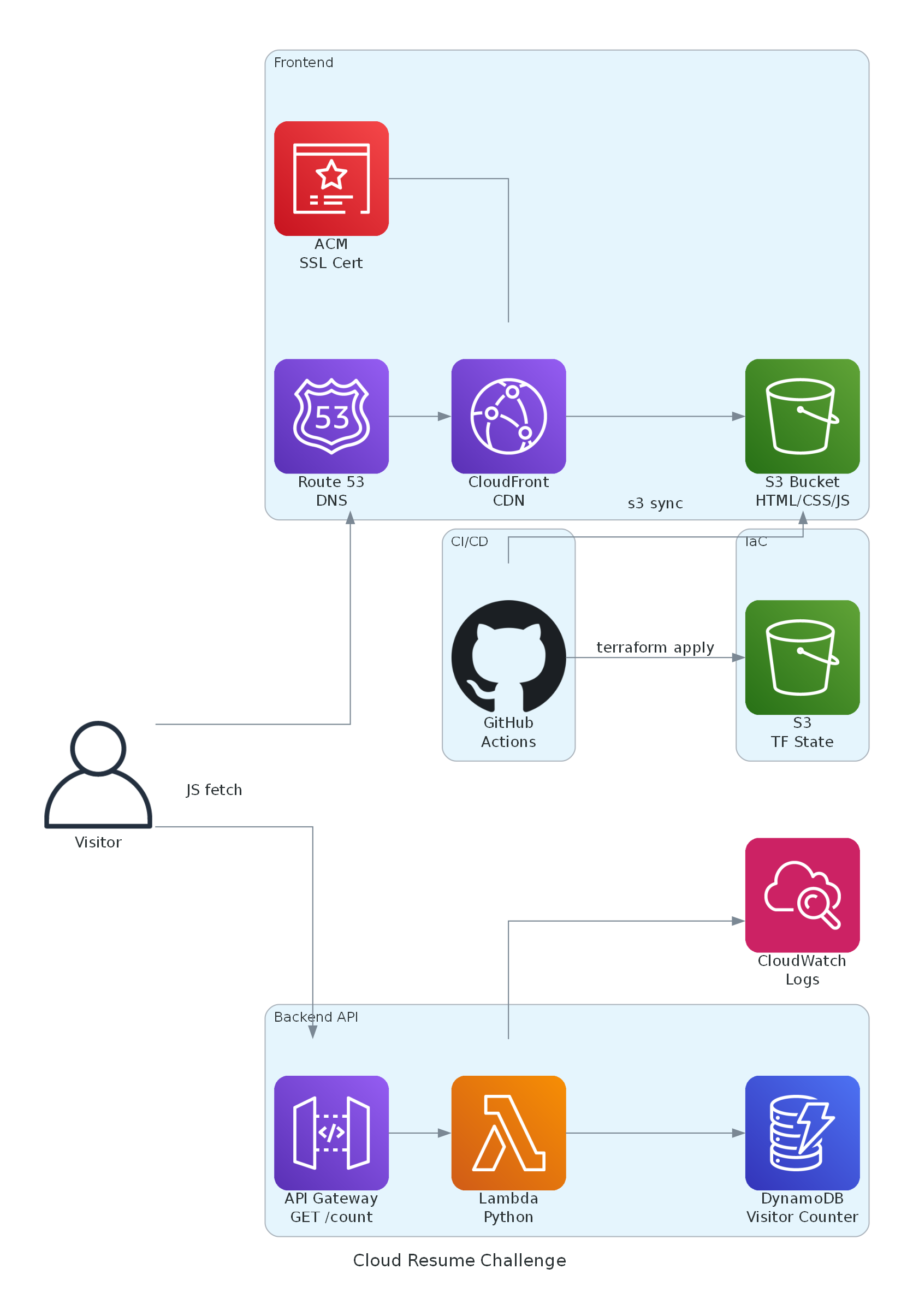
Static frontend in a private S3 bucket, served worldwide through CloudFront with an ACM TLS certificate and a Route 53 custom domain. A visitor counter runs on API Gateway → Python Lambda → DynamoDB. All infrastructure is defined in Terraform (split into frontend and backend modules) with remote state in S3 and DynamoDB state locking.
What I Personally Configured
- Private S3 bucket locked down with CloudFront Origin Access Control (OAC) — no public bucket access
- ACM certificate with DNS validation and a Route 53 A-record alias to the CloudFront distribution
- IAM roles and least-privilege policies, including GitHub OIDC federation so CI/CD uses short-lived tokens instead of stored keys
- Python Lambda using boto3 to run an atomic DynamoDB counter, fronted by an API Gateway HTTP API with CORS
- Terraform modules, remote state backend, and DynamoDB state locking
- Two GitHub Actions pipelines: backend runs pytest → terraform apply; frontend syncs to S3 → invalidates the CloudFront cache
Problems I Encountered & Solved
- The first backend CI/CD run failed on a test import path and an IAM policy scope issue — I diagnosed the logs, fixed the module import and tightened the frontend IAM policy, and the pipeline went green.
- The visitor counter double-counted on page navigation and refresh — I added client-side caching so a visit only increments once per session.
The Result
A live, fully automated serverless site running on 9 AWS services for roughly $0.50/month plus domain registration. Every push auto-deploys with no manual steps and no long-lived credentials anywhere.
AWS Cost Optimizer (FinOps Tool)
The Problem
Cloud spend is easy to lose track of, and idle resources quietly cost money. I wanted an automated tool that watches AWS spending, catches waste and anomalies early, and delivers plain-language recommendations without me having to log into the console.
The Architecture
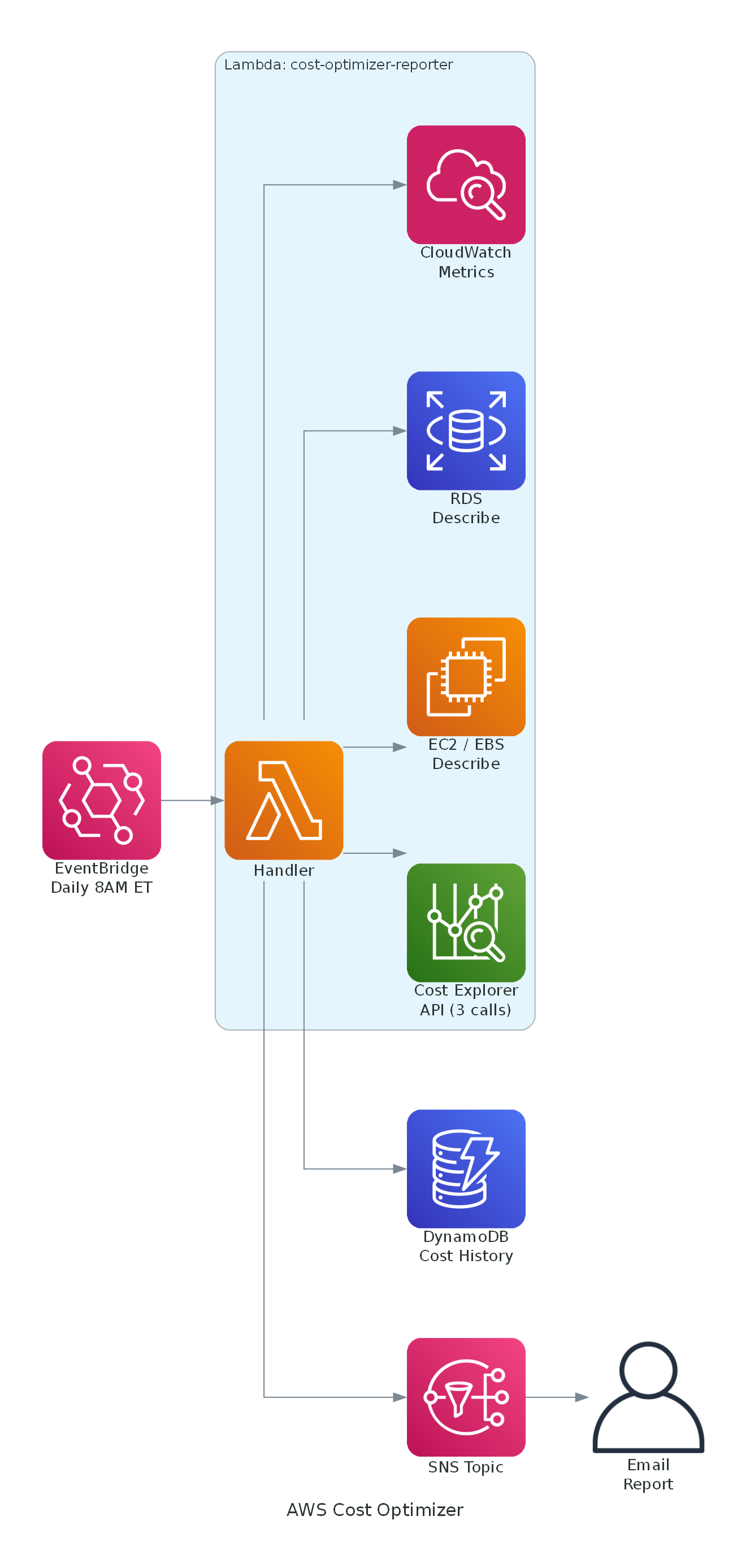
An EventBridge schedule triggers a Python Lambda every morning. The function pulls Cost Explorer data, scans EC2/RDS/EBS and CloudWatch metrics for idle resources, detects cost anomalies, stores history in DynamoDB, and sends a report through SNS by email. The entire stack is defined in AWS CDK (TypeScript).
What I Personally Configured
- EventBridge scheduled rule to trigger the Lambda daily at 8 AM ET
- Python Lambda making Cost Explorer API calls and read-only EC2/RDS/CloudWatch calls to find idle resources
- Waste detection: unattached EBS volumes, unused Elastic IPs, old snapshots, and low-CPU EC2 / zero-connection RDS instances
- Anomaly detection with configurable day-over-day (>50%) and month-over-month (>20%) thresholds
- DynamoDB table with a 90-day TTL for cost history, and an SNS topic for email delivery
- Least-privilege IAM scoped to specific resource ARNs via CDK grant helpers, deployed through GitHub Actions with OIDC
The Result
A hands-off FinOps report that lands in my inbox every morning with top spend, trends, a month-end forecast, waste findings with dollar estimates, and recommendations — running for about $0.90/month with zero external Lambda dependencies.